BitRecover PST to PDF Wizard Pro 26.1
Our software allows you to batch export PST files to PDF while ensuring data integrity. It provides advanced filters and pre-defined folder naming options for selective and organised PST to PDF conversion. Additionally, this tool is suited for professionals who need reliable PST to PDF conversion for archival, auditing, or compliance workflows.
Languages: English | File Size: 89 MB
Наше программное обеспечение позволяет пакетно экспортировать PST-файлы в PDF, обеспечивая при этом целостность данных. Оно предоставляет расширенные фильтры и предварительно заданные параметры именования папок для выборочного и упорядоченного преобразования PST в PDF. Кроме того, этот инструмент подходит для профессионалов, которым требуется надежное преобразование PST в PDF для архивирования, аудита или обеспечения соответствия нормативным требованиям.
Batch convert PST files to PDF format without size limitations.
Export selective PST folders to PDF for enhanced productivity.
Facility to include and exclude meta headers during PST to PDF conversion.
Provides an option to convert PST file attachments into PDF document pages.
Black and white mode is available to save PST as non-searchable PDF documents.
10+ file naming conventions to manage resultant PDFs with different names.
Use the Recovery Mode option to export emails from corrupted PST file to PDF.
Advanced filter options allow users to export specific PST data in output PDF format.
Users can manually select PST files or automatically load them from configured Outlook profiles.
Batch Convert PST to PDF
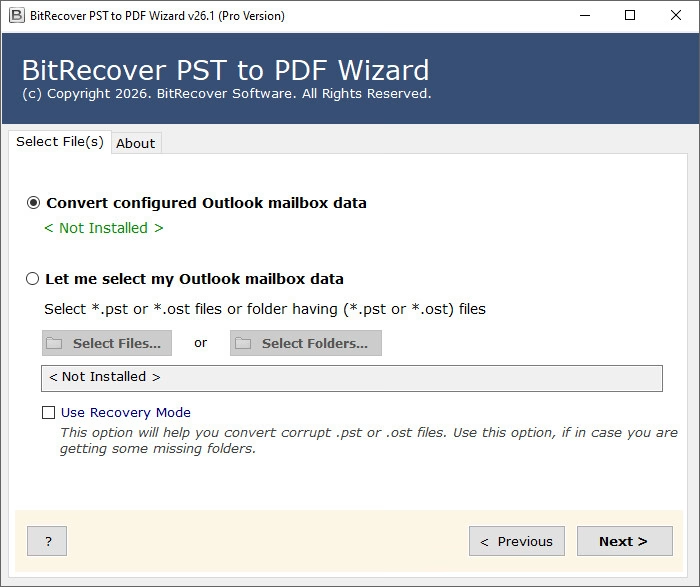
The tool provides two modes to convert PST files into Adobe PDF documents. Users can add one or multiple PST files in bulk from local storage. Alternatively, the software’s auto-add option allows users to directly load data from configured Outlook profiles. Both options include bulk conversion of PST files to PDF, including attachments and metadata.
Recovery Mode for Corrupt Files
If someone wants to convert a corrupted PST file to Adobe PDF, they can select the "Use Recovery Mode" option. We recommend this feature if you get some missing folders while adding a PST in the GUI. However, BitRecover recommends using the PST Repair Tool to make healthy PST files.
Include and Exclude Meta Headers
A new feature in the PST to PDF converter software has been unlocked by popular demand: the tool now exports PST files to PDF including meta headers. If users prefer to exclude folders, all they have to do is simply select "Exclude Meta Headers" option. Afterwards software will immediately exclude From, To, CC, BCC, Subject, and Date during the conversion.
PST into PDF Converter Online Vs Offline BitRecover PST to PDF Wizard
The online PST into PDF Converters are capable of exporting small-sized PST into PDF on users' local browser. In case of larger PST files, the online solutions require exporting the data to their server for converting the Outlook data file to PDF documents. In such instances, there is a high chance that users' confidential information could be breached.
To minimize such contingencies, the offline solution, like BitRecover PST to PDF Wizard, is the top choice for for Mac and Windows. That keeps your data completely secure and integrated during the PST to PDF conversion process. Moreover, the offline PST to PDF exporter never store any piece of your data on their server, keeping your Outlook data safe as it processes only on your local Mac or Windows machine.
Home Page - https://www.bitrecover.com/pst-to-pdf/
Download from file storage
BitRecover PST to PDF Wizard Pro 26.1 + crack-MADARA
Users of Guests are not allowed to comment this publication.