Catharacta Studio Hamaguri Blur 1.0.4
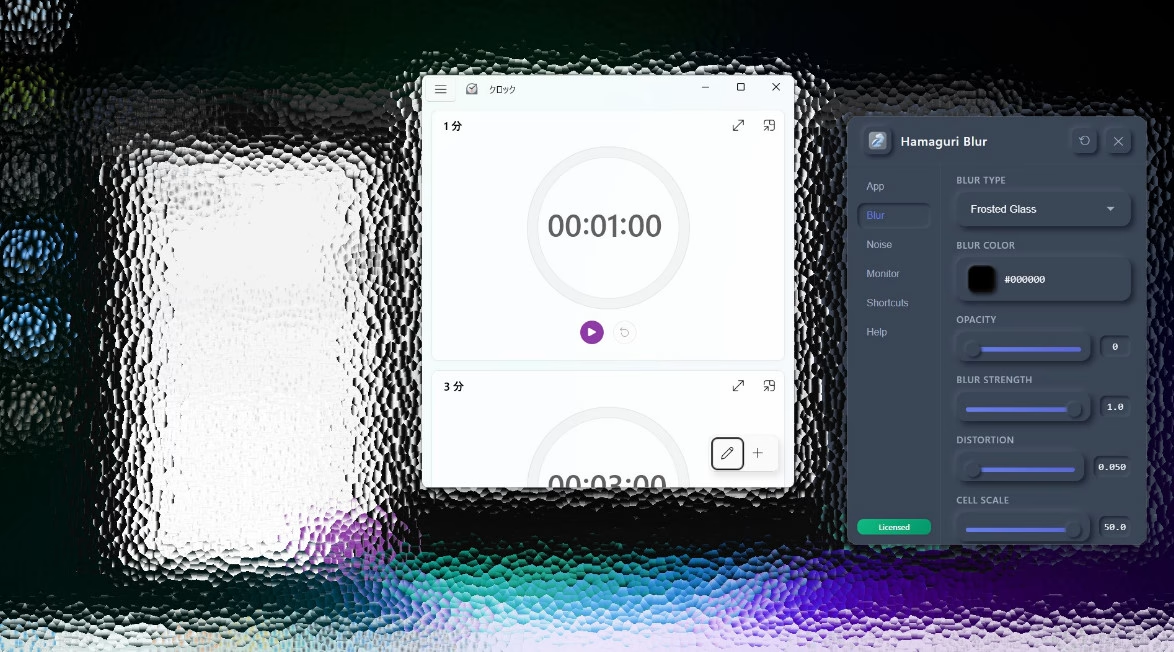
Hamaguri Blur is a productivity tool designed to help you focus on your active task by visually dampening the "noise" of your desktop. It applies a customizable blur overlay to your screen, fading out background windows, icons, and clutter, so you can concentrate solely on what you are working on right now.
Languages: English | File Size: 6 MB
Hamaguri Blur — это инструмент повышения производительности, разработанный для того, чтобы помочь вам сосредоточиться на текущей задаче, визуально подавляя «шум» рабочего стола. Он применяет настраиваемое размытие к экрану, скрывая фоновые окна, значки и беспорядок, чтобы вы могли сосредоточиться исключительно на том, над чем работаете в данный момент.
Boost Your Concentration Modern desktops are filled with distractions. Hamaguri Blur allows you to mask the chaos of inactive windows and wallpapers with a soft, pleasing blur, creating a "tunnel vision" effect for your work.
Key Features:
Focus-Centric Design: Instantly apply a blur layer to the background, highlighting your active work area.
Customizable Atmosphere: Adjust blur type (Gaussian, Acrylic), intensity, opacity, and tint color to create your perfect deep-work environment.
Global Control: Toggle focus mode instantly with customizable keyboard shortcuts or mouse gestures without leaving your keyboard.
Multi-Monitor Support: Manage distractions across all your displays or specific monitors.
Native Performance: Lightweight and optimized interaction with the Windows Desktop Window Manager (DWM).
(Note: While screen capture support is available via settings, it is disabled by default to prioritize system performance.)
Home Page - https://apps.microsoft.com/detail/9msq8qvv2pjs?hl=en-US
Download from file storage
Catharacta Studio Hamaguri Blur 1.0.4, thx CORE for Retail
Users of Guests are not allowed to comment this publication.