Transparent Screen Lock Pro 6.26.00
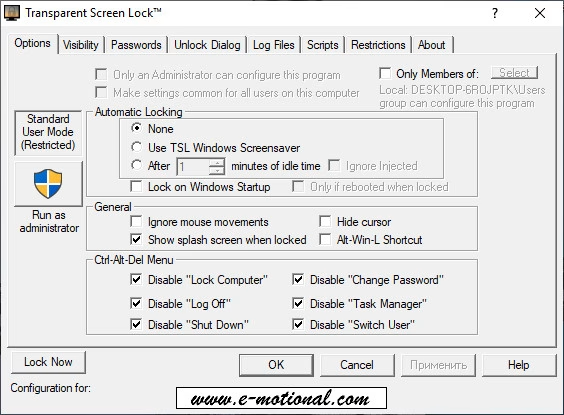
Use this Transparent Screensaver to secure your workstation or server with Password Protection while viewing programs that are running in the background.
Languages: English | File Size: 9 MB
Используйте Transparent Screensaver для защиты вашей рабочей станции или сервера паролем, сохраняя при этом возможность наблюдения за программами, работающими в фоновом режиме.
ACCESS CONTROL AND DATA SECURITY...
Transparent Screen Lock™ PRO enables IT professionals to prevent unauthorized system access, while maintaining the ability to view applications running on the desktop for monitoring purposes.
...FOR MANY DIFFERENT USES...
Transparent Screen Lock™ PRO delivers system security measures that are essential in today's open-concept corporate offices with free movement of employees and visitors. This effective method of access control is also essential in high-security environments
such as:
- Financial institutions, banks
- Hospitals, pharmaceutical research facilities
- Government offices, military installations
...THAT MEET A VARIETY OF NEEDS.
With its ability to limit system access to authorized individuals in both stand-alone and multiple-user shared computer environments, Transparent Screen Lock™ PRO is ideal for facilities that must ensure compliance to various federal regulations,
such as:
- HIPAA
- HITECH
- FDA 21 CFR Part 11
- GDPR
Password Protection
Any attempts to access your workstation or server while TSL is running (by typing a key or moving the mouse) require a valid username and password to be entered. If no password is entered, the password dialog box will disappear after 5 seconds, and the system will remain locked.
Options include:
- USE WINDOWS LOGON PASSWORD: The software will expect the user to type in their Windows logon password (same password that is used to log on to their account) Note: This is the default option.
- CONFIGURE WITH NEW PASSWORD: You may also choose to enter a different password manually via the configuration program.
- ALTERNATE CHARACTERS: On international keyboards, alternate characters can be used in the password.
Grant access to specific users/groups
Ideal for multiple-user shared computer environments. Enables an administrator, a specified group of users, and/or other authenticated users to access the system without closing the current session. Options include:
- Accept current user's password only
- Accept users with Administrative Privileges
- Accept any valid username/password combination in the facility
- Accept members of a specified "User Group" (local or global)
- "Unlock" configuration tab provides additional control over how the password dialog box is displayed, including options to automatically populate the username field, restrict access to users of one domain only, and configure a timeout value.
Simplified configuration in a multiple-user shared computer environment
- An Administrator can install the program once, and the program and associated icons will automatically be available on the desktop of all users sharing the computer.
- Make program settings on a per-user basis or on a system/machine basis.
- Manage TSL configuration using Group Policy Objects (GPOs)
Home Page - https://www.e-motional.com/TScreenLock.html
Download from file storage
Transparent Screen Lock Pro 6.26.00 + key-ByTESRam
Users of Guests are not allowed to comment this publication.